

On this page
Apply CDC changes to a streaming table
Let’s turn a stream of customer change rows — inserts, updates, and deletes, arriving out of order — into a clean, current-state silver dimension. The latest change per key wins, and a delete removes the row. And let’s do it without hand-writing a single line of merge logic.
You could hand-write this: a foreachBatch that runs a MERGE, matching
each change to its target row on the key, ordering out-of-order changes so a
stale update never clobbers a fresh one, and branching to delete instead of
upsert when a row is a tombstone. Or you declare mode: cdc, hand Lakehouse
Plumber the keys and the ordering column, and let it write the apply-changes
flow. That is the idea on every page: declare your ETL, don’t hand-write it.
The change in intent is one block. A standard streaming table appends every
incoming row; add mode: cdc with a cdc_config and the same write target
applies each row as a change instead. LHP writes the rest.
Choose the history you need
For one key changing from Basic to Plus to Pro, append retains the incoming
rows, SCD1 retains the current state, and SCD2 retains versions when changes to
tier are tracked. The intervals below use the ordering values supplied by
sequence_by; they are illustrative, not wall-clock timestamps.
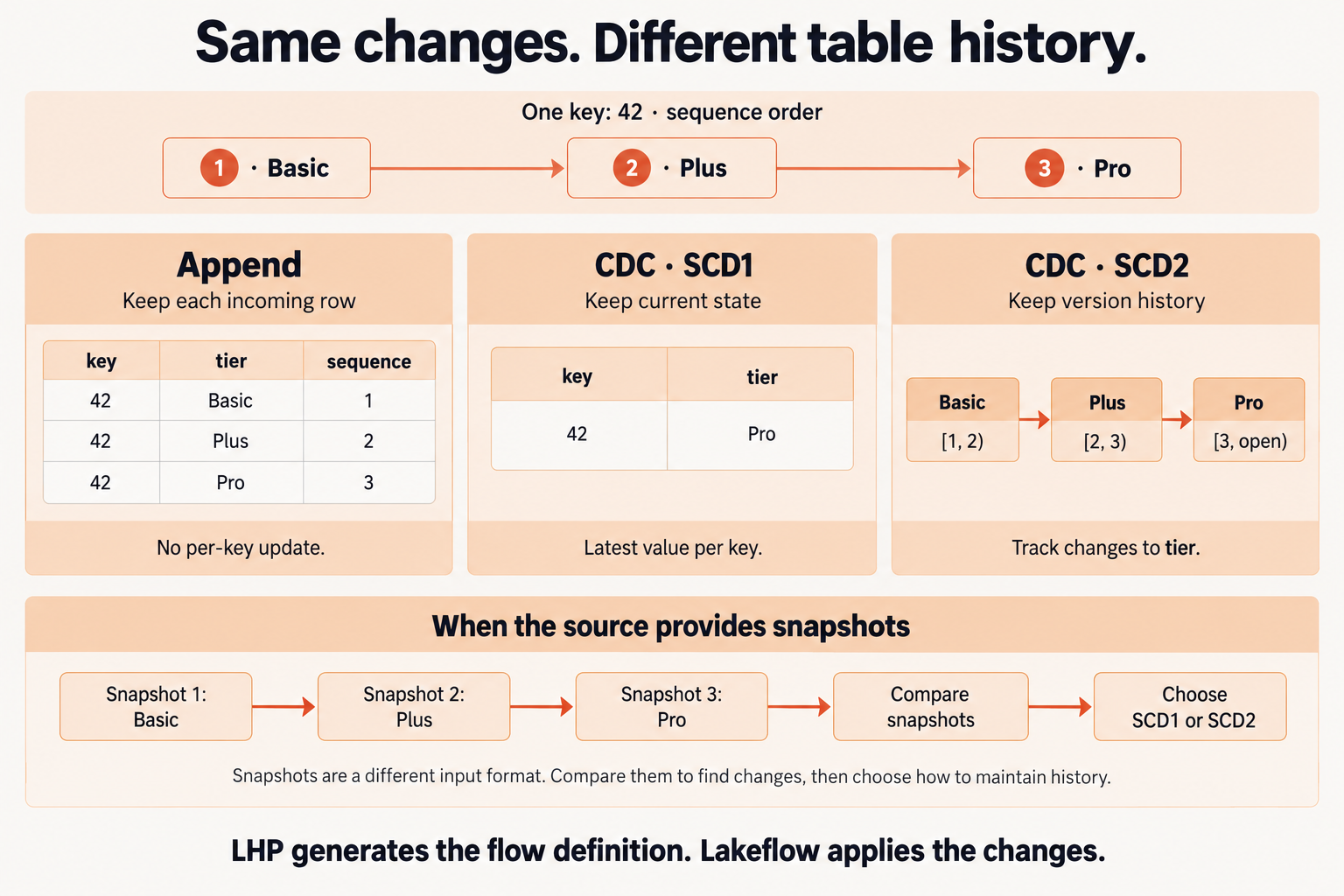
Input format and history policy are separate choices. LHP generates the flow definition; Lakeflow applies the changes. Select the diagram to view it full size.
Snapshot CDC derives changes from ordered snapshots instead of consuming change rows. Both CDC modes support SCD1 and SCD2. See Databricks’ AUTO CDC documentation for the runtime semantics.
Before you start
You need a Lakehouse Plumber project (see the Get Started course for
lhp init) and a source of change rows. This guide reads a bronze
customer_changes table that another pipeline lands — each row is one change
record carrying an operation marker (INSERT / UPDATE / DELETE)
and a sequence_num that orders changes per customer. A CDC write applies
changes; it does not produce them.
Declare the CDC write
The flowgroup has two actions: a load that streams the change table into a
view, and a write whose write_target is a streaming_table in
mode: cdc. Create pipelines/silver_customers.yaml:
# Turn a stream of customer change rows into a current-state silver dimension.
# Action chain: load (delta, streaming read of a change table) -> write (streaming_table, mode: cdc).
#
# The write is AUTO CDC: LHP emits dp.create_auto_cdc_flow, which upserts each
# change onto the keys, orders competing changes by sequence_by, and turns
# tombstone rows into deletes through apply_as_deletes.
pipeline: silver_customers
flowgroup: customer_dim

actions:
  # 1. Load: stream the bronze change table another pipeline lands. Each row is
  #    one change record and carries an `operation` marker (INSERT/UPDATE/DELETE).
  - name: load_customer_changes
    type: load
    readMode: stream
    source:
      type: delta
      catalog: "${catalog}"
      schema: "${bronze_schema}"
      table: customer_changes
    target: v_customer_changes

  # 2. Write: apply the changes into a silver dimension with AUTO CDC (SCD Type 1).
  - name: write_customer_dim
    type: write
    source: v_customer_changes
    write_target:
      type: streaming_table
      catalog: "${catalog}"
      schema: "${silver_schema}"
      table: customer_dim
      mode: cdc
      cdc_config:
        keys: [customer_id]
        sequence_by: sequence_num
        scd_type: 1
        apply_as_deletes: "operation = 'DELETE'"
        except_column_list: [operation, sequence_num]
mode: cdc is the switch; cdc_config is the whole contract, and every
field maps to how the change is applied:
keys— the business key AUTO CDC matches each change against. Here a singlecustomer_id; it can be several columns.sequence_by— the column that orders competing changes for a key, so a late-arriving stale row never overwrites a newer value. A single column name here; it also accepts a list.scd_type—1keeps only current state (overwrite on update);2keeps full history. This guide starts with Type 1.apply_as_deletes— a SQL expression; rows that match it remove the key instead of upserting it. Here, tombstone rows whereoperationis'DELETE'.except_column_list— columns the flow uses but does not store in the dimension. The two control columns,operationandsequence_num, drive the apply but are not part of the customer record.
The load reads with readMode: stream, so each new batch of changes flows
through continuously. The ${...} tokens resolve per environment from
substitutions/dev.yaml, so the same flowgroup targets dev, staging, and prod
unchanged. The write action reference covers the rest of cdc_config —
track_history_column_list, ignore_null_updates, apply_as_truncates,
column_list — and their constraints. Snapshot-based CDC, where the source is
periodic full snapshots rather than a change stream, is a separate write mode
and a separate guide.
Generate the pipeline
Validate first, then generate:
$ lhp validate --env dev
✓ discover (0.01s)
✓ preflight (0.00s)
✓ silver_customers  0 files
✓ validate (0.33s)
1 validated · 0.3s

$ lhp generate --env dev
✓ discover (0.01s)
✓ preflight (0.00s)
✓ silver_customers  1 file
✓ generate (0.41s)
✓ format (0.02s)
✓ monitoring (0.00s)
1 pipeline generated · 1 file · 0.4s
validate resolves the tokens and checks the cdc_config — that keys
is present, that scd_type is 1 or 2, that the column lists are not
in conflict — before you commit to generating.
Read what Lakehouse Plumber wrote
Open generated/dev/silver_customers/customer_dim.py. This is the entire
output — nothing is hidden behind a runtime:
# Generated by LakehousePlumber
# Pipeline: silver_customers
# FlowGroup: customer_dim

from pyspark import pipelines as dp

# Pipeline Configuration
PIPELINE_ID = "silver_customers"
FLOWGROUP_ID = "customer_dim"


# ============================================================================
# SOURCE VIEWS
# ============================================================================


@dp.temporary_view()
def v_customer_changes():
    """Delta source: dev_catalog.bronze.customer_changes"""
    df = spark.readStream.table("dev_catalog.bronze.customer_changes")

    return df


# ============================================================================
# TARGET TABLES
# ============================================================================

# Create the streaming table for CDC
dp.create_streaming_table(
    name="dev_catalog.silver.customer_dim", comment="Streaming table: customer_dim"
)

# CDC flow: f_customer_dim
dp.create_auto_cdc_flow(
    target="dev_catalog.silver.customer_dim",
    source="v_customer_changes",
    name="f_customer_dim",
    keys=["customer_id"],
    sequence_by="sequence_num",
    stored_as_scd_type=1,
    except_column_list=["operation", "sequence_num"],
    apply_as_deletes="operation = 'DELETE'",
)
There is no MERGE and no foreachBatch. LHP wrote two things: a
dp.create_streaming_table that declares the target dimension, and one
dp.create_auto_cdc_flow that applies the changes into it. Every field of
your cdc_config came through as an argument — keys=["customer_id"],
sequence_by="sequence_num", stored_as_scd_type=1,
apply_as_deletes="operation = 'DELETE'", and
except_column_list=["operation", "sequence_num"] — and the ${...} tokens
resolved into the three-part name dev_catalog.silver.customer_dim. You
described the change semantics; LHP wrote the declaration that enforces them.
Note
dp.create_auto_cdc_flow is Databricks’ AUTO CDC — the declarative form of
apply-changes. Lakehouse Plumber decides how the flow is wired and
declared; Databricks applies the changes at run time. The source must be a
streaming read (readMode: stream), which is what feeds each new batch of
changes through the flow.
Switch to SCD Type 2
SCD Type 1 keeps only the current row per key. To keep full history instead — a
new versioned row on every change, with the validity windows maintained for you
— change one field: set scd_type: 2. LHP emits stored_as_scd_type=2 in
the same create_auto_cdc_flow, and the dimension starts tracking history. To
exclude audit columns from what counts as a tracked change, add
track_history_except_column_list. One constraint carries over from
Databricks: apply_as_truncates is not supported with SCD Type 2 — it is a
Type 1 option only.
What you just did
Twenty-seven lines of YAML compiled to forty-four lines of Lakeflow Python.
Zero lines of merge logic came from you — not the create_auto_cdc_flow
call, not the key matching, not the sequencing that resolves out-of-order
changes, not the delete branch. You declared the change semantics in a
cdc_config block, and LHP owns the apply-changes boilerplate.
Flip scd_type and the kind of history changes with it; the wiring stays
LHP’s job. That is the payoff: the CDC contract is a short declaration, and the
generated Python is code you own — version it, diff it, open it in the
Databricks editor like anything else.
What’s next
Handle periodic snapshots instead of a change stream. When the source is full-table snapshots rather than row-level changes, a separate write mode (snapshot CDC) computes the diff for you — covered in its own guide.
See every CDC option.
track_history_column_list,ignore_null_updates,apply_as_truncates,column_list, and multi-columnsequence_byall live on the samecdc_config. The write action reference lists them with their constraints.Fan several change sources into one dimension. Multiple CDC write actions that target the same table combine into a single
create_streaming_tablewith one apply-changes flow per source.
Syntax and options
See CDC streaming table for all supported settings and defaults.